
MinIO
As a MinIO partner, Data Dynamics supports S3-compatible object storage adoption for enterprise data and AI workloads.
Shared object storage for data and AI
Store files, documents, images and analytical data through S3-compatible APIs, then use them with your engines and applications.
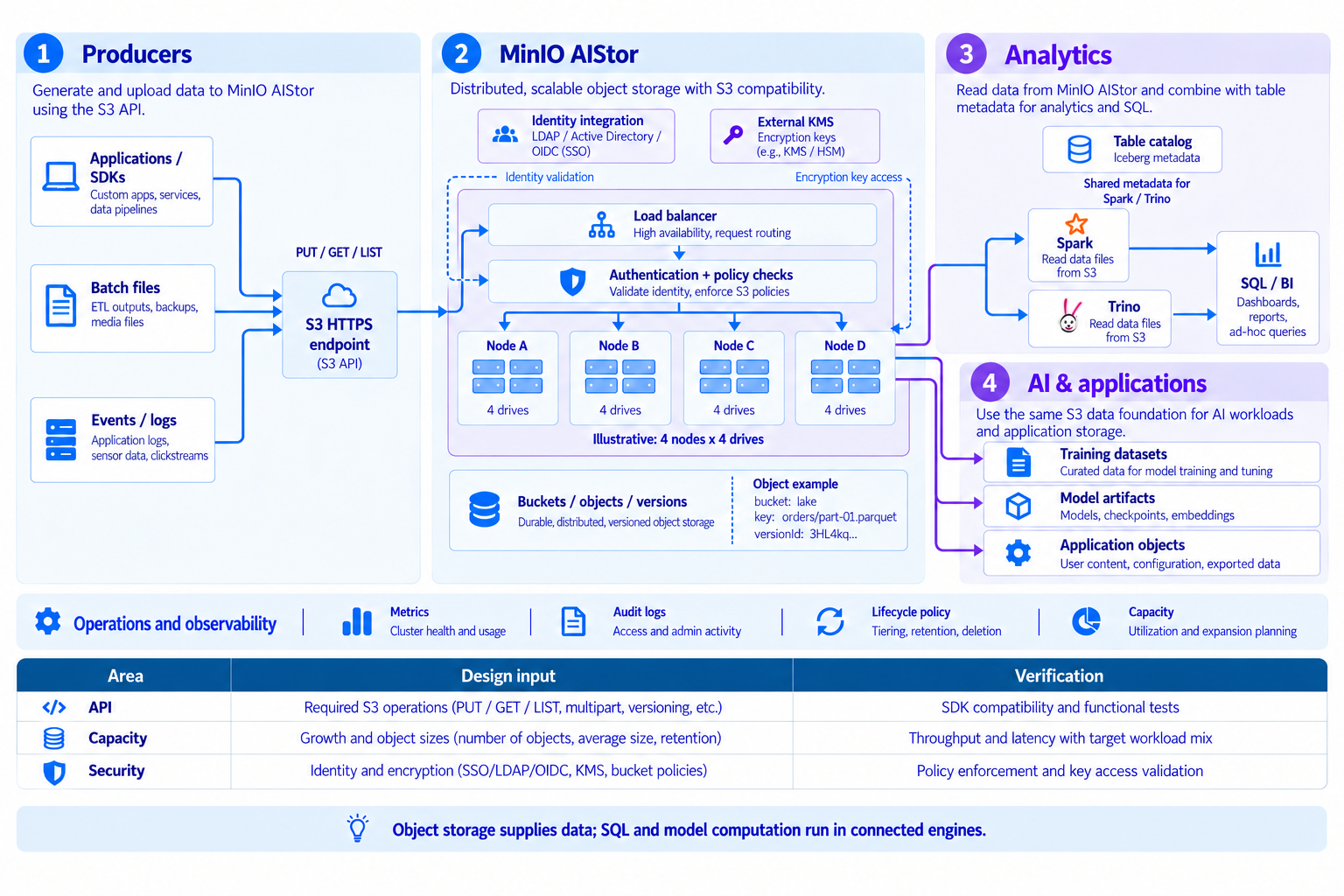
Read diagram, product and service details
- 1.Store data
- Store business files, documents, images, logs and analytical datasets as objects.
- 2.MinIO AIStor
- Organize object storage access and operations around S3-compatible APIs and buckets.
- 3.Connect analytics
- Validate supported connectors and table formats for engines such as Spark and Trino.
- 4.Enable AI and applications
- Store training data, model artifacts and retrieval source documents for AI pipelines and business applications.
MinIO AIStor object storage
MinIO AIStor provides object storage through S3-compatible APIs. Store documents, images, logs, analytical datasets and model artifacts on infrastructure you manage, and connect them to processing engines, AI pipelines and business applications. Data Dynamics helps define the configuration, delivery and operating support appropriate to your environment.
- Object access through S3-compatible APIs
- A shared storage foundation for analytics, AI and applications
- Erasure coding, versioning and object locking
- Protection and recovery planning with replication and retention
S3 compatibility does not mean identical behavior across every service and API. Validate required APIs, authentication and network paths in a PoC.
Official documentationFour complementary layers of data protection
Device failures, accidental changes, retention requirements and site failures call for different controls.
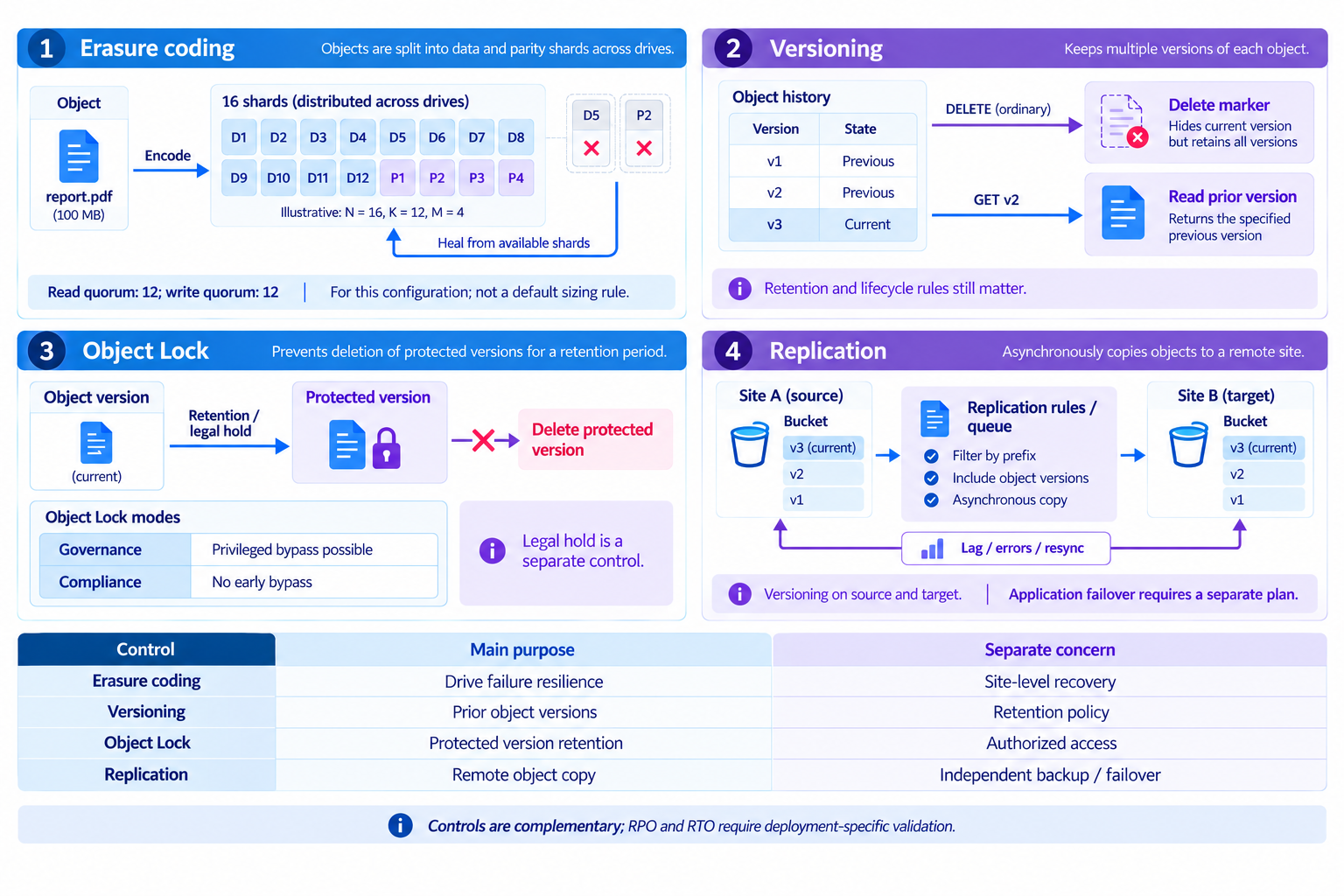
Read diagram, product and service details
- 1.Erasure coding
- Distribute data and parity shards to tolerate device failures. Tolerance depends on the deployment configuration.
- 2.Versioning
- Preserve object versions in enabled buckets and recover the version you need.
- 3.Object lock
- Restrict object-version deletion and modification according to retention periods and lock modes.
- 4.Replication
- Replicate to separate clusters or sites, and verify recovery objectives and procedures.
Replication does not replace independent backups or recovery drills. Design RPO/RTO, delete propagation, retention, access control and recovery validation together.
Official documentationFrom NiFi and S3 to Iceberg queries
Separate Parquet uploads from Iceberg metadata commits before querying with Starburst.
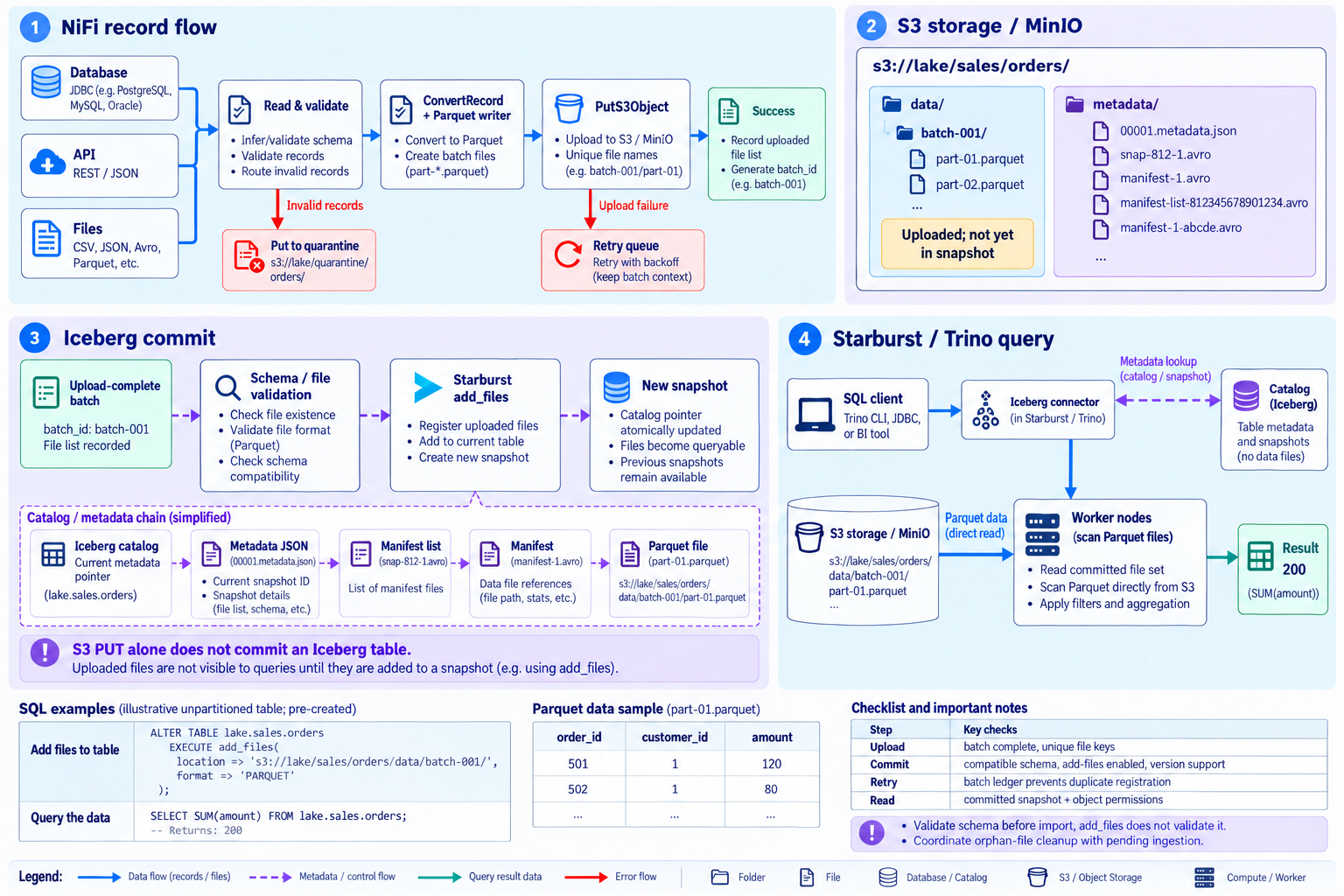
Read diagram, product and service details
- 1.NiFi records
- Validate, convert to Parquet, upload with PutS3Object and record the successful batch file list.
- 2.S3 files
- Store files under the table data path on MinIO or S3 storage. Upload alone does not include a file in an Iceberg snapshot.
- 3.Iceberg commit
- Validate the completed batch schema before registering files with add_files or another supported procedure. add_files does not validate schema compatibility.
- 4.Starburst query
- Resolve the committed snapshot through the catalog; workers read referenced Parquet files directly from storage.
Example uses a pre-created unpartitioned table. Verify add_files support/configuration, schema and permissions; prevent duplicate imports and cleanup of pending files.
Official documentationMinIO OSS and commercial AIStor capabilities
Distinguish shared object-storage foundations from AIStor table, QoS and operational extensions.
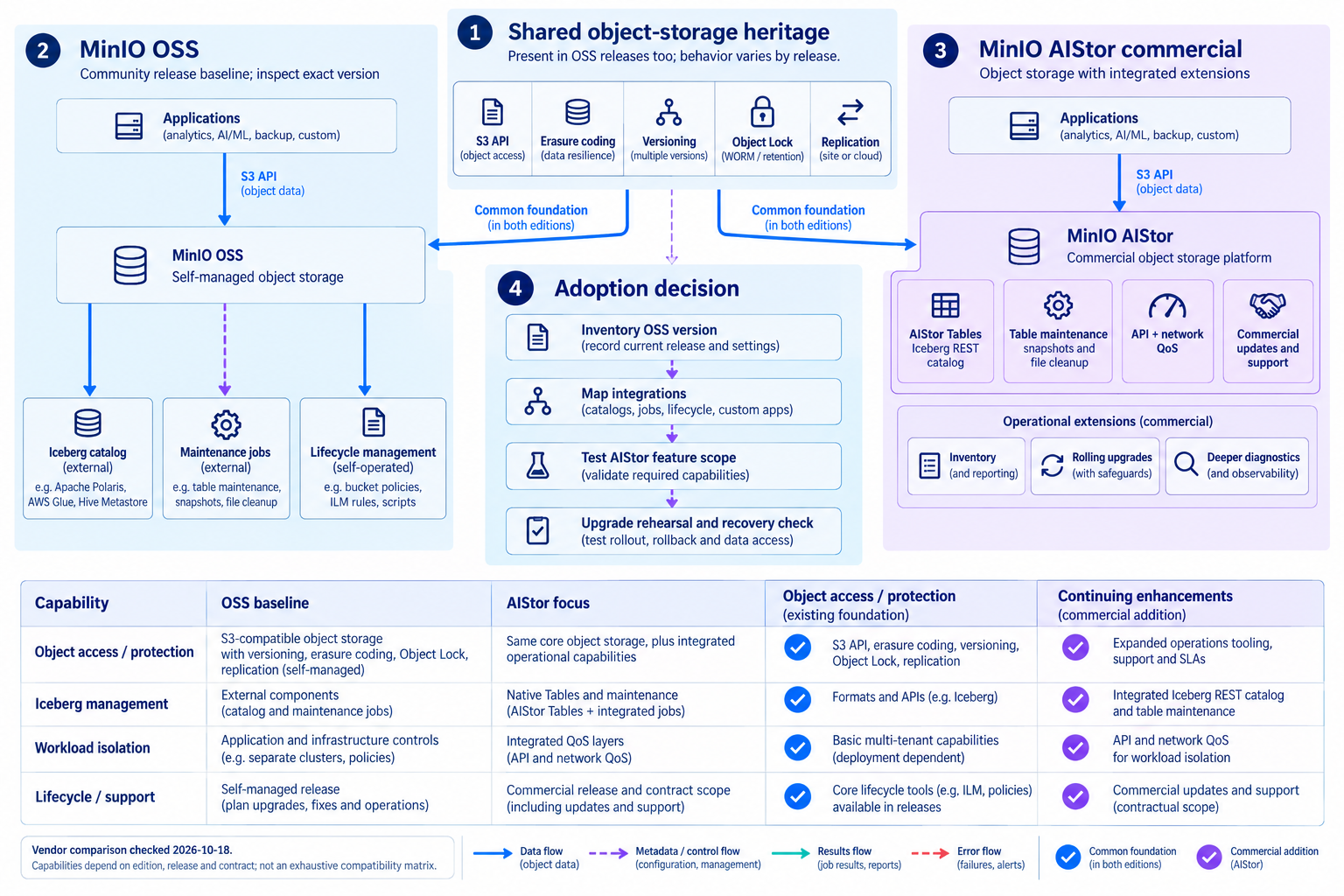
Read diagram, product and service details
- 1.Shared foundation
- Basic storage and protection are shared heritage, not labeled commercial-only.
- 2.OSS deployment
- Review the chosen community release, external catalog/maintenance components and self-managed responsibilities.
- 3.AIStor extensions
- Evaluate native Iceberg REST catalog, table maintenance, QoS, commercial updates/support and operating extensions.
- 4.Adoption checks
- Inventory versions and integrations, validate required features, then rehearse upgrade and recovery.
Based on official documentation checked on 2026-10-18. OSS releases also include S3, erasure coding, versioning, locking and replication. Verify exact release and contract scope.
Official documentationIntegrated Iceberg management with AIStor Tables
Separate engine compute from AIStor catalog, file access and table maintenance.
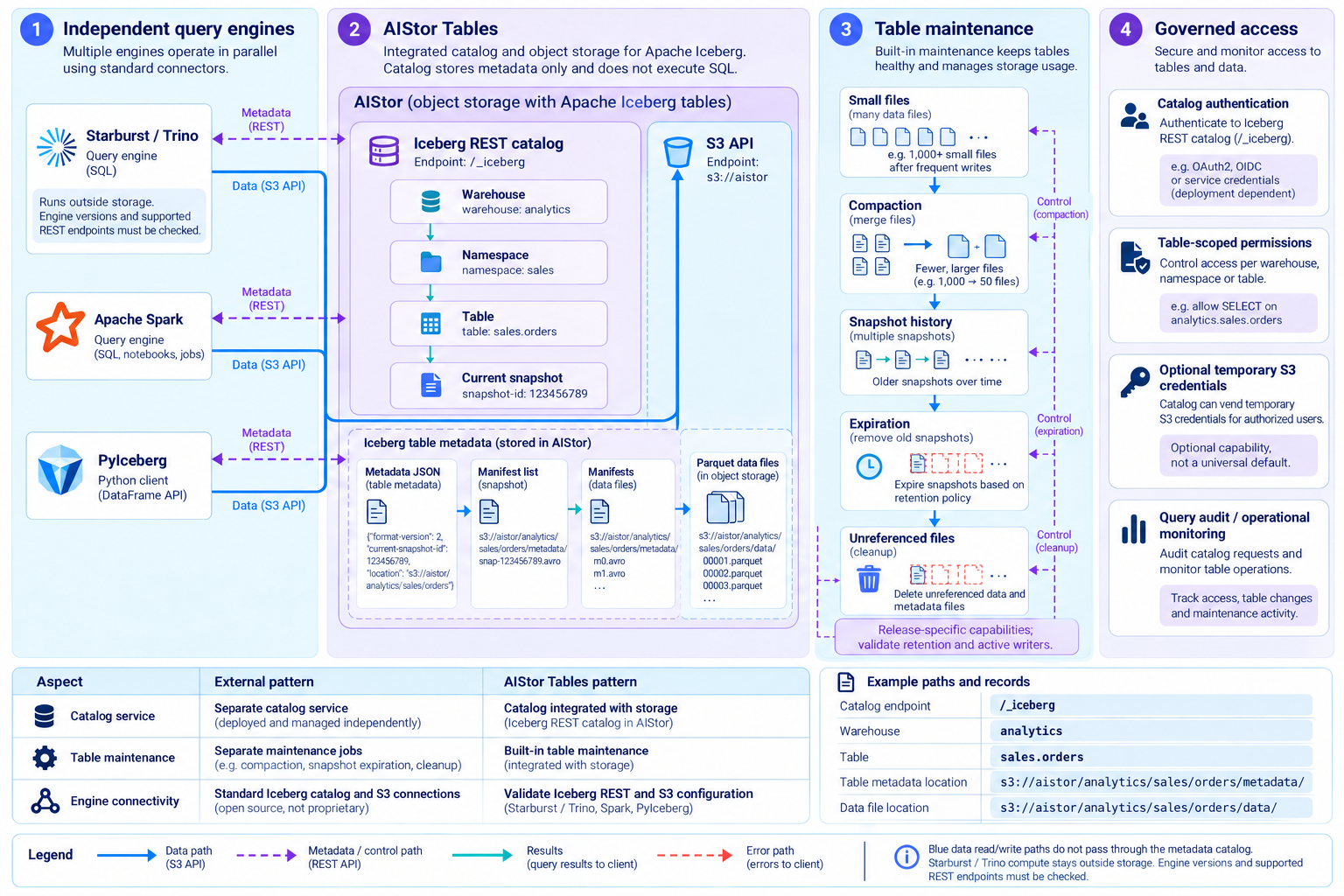
Read diagram, product and service details
- 1.Independent engines
- Starburst/Trino, Spark and PyIceberg access catalog metadata and S3 data separately.
- 2.Native catalog
- AIStor Tables manages warehouses, namespaces, tables and snapshots through its Iceberg REST catalog.
- 3.Table maintenance
- Use release-supported compaction, snapshot expiration and unreferenced-file cleanup.
- 4.Access and integration
- Validate catalog authentication, table permissions and optional temporary S3 credentials. SQL compute remains in external engines.
Verify engine versions, supported REST APIs, authentication and credential-vending configuration. Table maintenance differs from ordinary bucket lifecycle rules; coordinate retention and active writes.
Official documentationAIStor workload controls and operations
Connect two QoS layers, controlled upgrades and operational evidence.
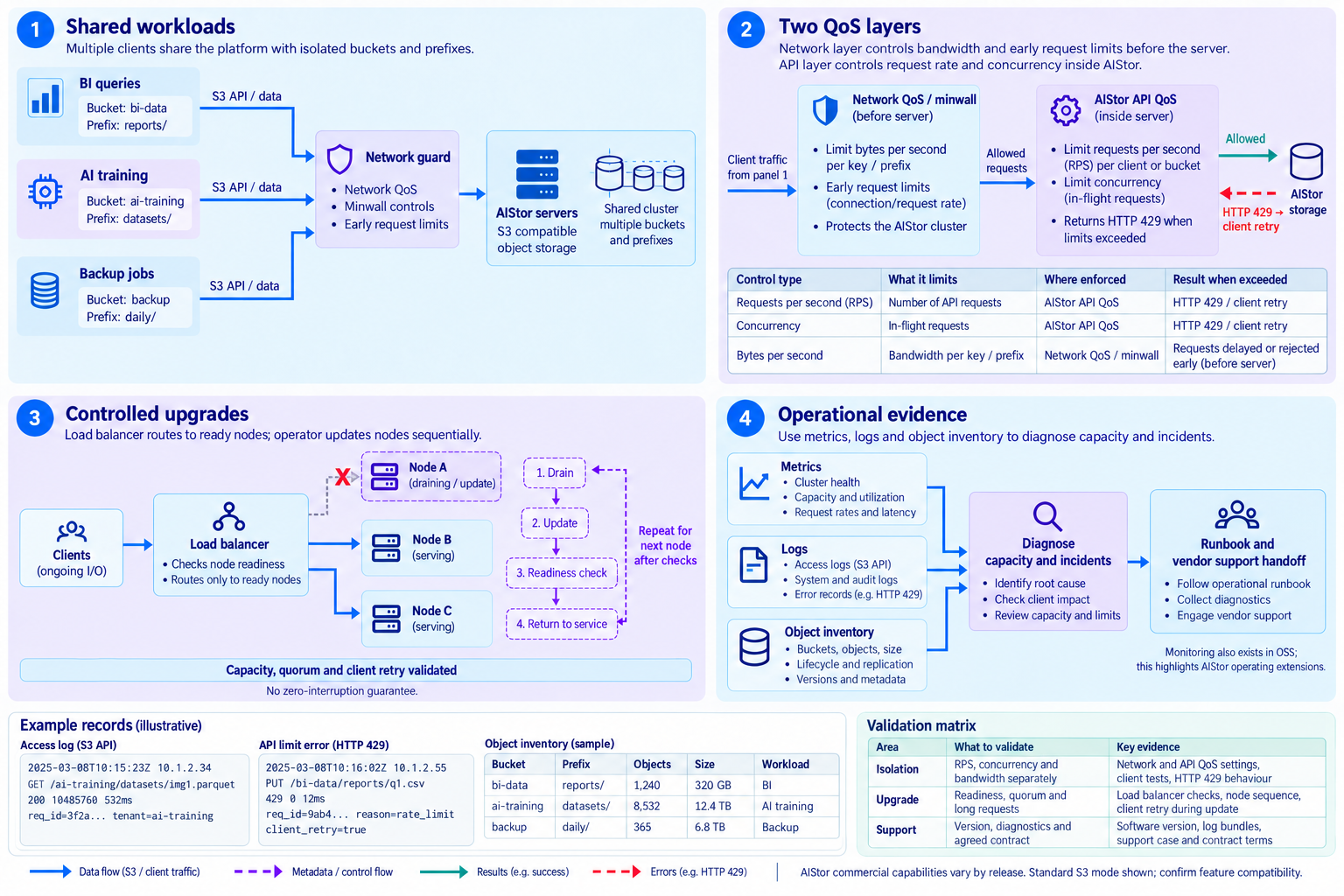
Read diagram, product and service details
- 1.Shared workloads
- Separate BI, AI training and backup traffic by bucket and prefix.
- 2.Two QoS layers
- API QoS controls request rate and concurrency; minwall controls network bandwidth and early request limits.
- 3.Controlled upgrades
- Validate load-balancer readiness checks and node drain/update/return procedures.
- 4.Operating evidence
- Use metrics, logs and inventory for diagnosis, runbooks and support within the agreed contract.
Standard S3 mode is shown. Distinguish API/network controls and validate quorum, spare capacity, long requests and client retries during upgrades. Monitoring also exists in OSS.
Official documentationMinIO adoption support from Data Dynamics
Connect product and workload choices to assessment, validation and operational handover.
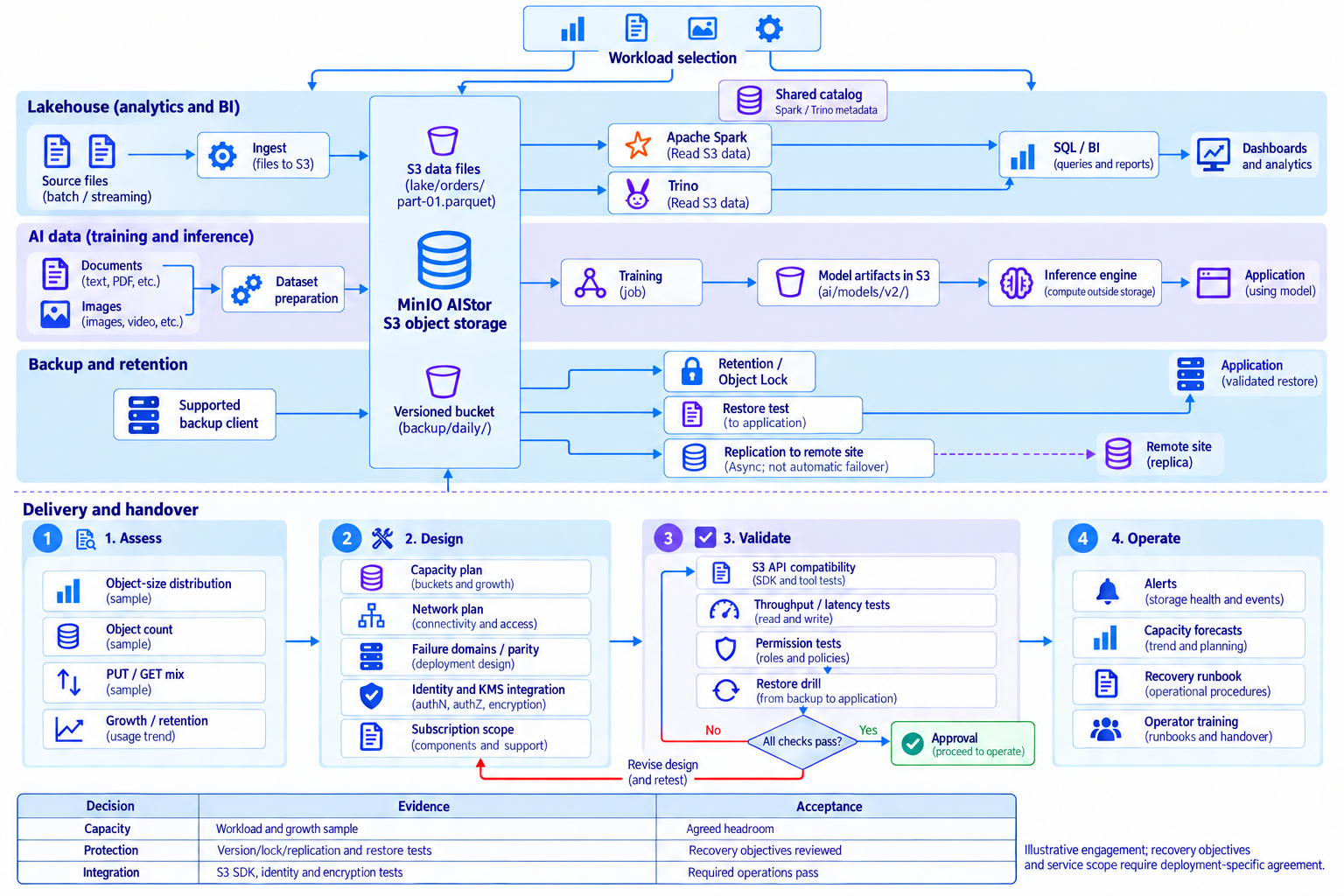
Read diagram, product and service details
- 1.Assess requirements
- Inventory existing systems, data, workloads and operating constraints to define scope.
- 2.Select products and configuration
- Review products, deployment, capacity, access and procurement scope for the intended workloads.
- 3.Validate and transition
- Check correctness, performance and integration with representative workloads, acceptance criteria and recovery procedures.
- 4.Operate and train
- Prepare monitoring, runbooks, upgrade plans and team training for operational handover.
Key use cases
- Data lakes and lakehouses
Store analytical files and open-table-format data files, connected to compatible catalogs and query engines.
S3 API · Spark · Trino · Iceberg
- AI data foundation
Store training datasets, source documents, images and model artifacts for AI processing and retrieval pipelines.
Training data · Model artifacts · Documents · Images
- Retention and backup storage
Integrate supported backup tools and configure versioning and retention. Validate recoverability with actual procedures.
Versioning · Object Lock · Recovery validation
Plan around your actual workload
Define scope using data requirements and operating conditions, not a feature checklist alone.
- Workload and capacity
Review object sizes and counts, read/write mix, throughput, growth and retention.
- Protection and recovery
Separate the roles of failure domains, parity, versioning, locks, replication and independent backups.
- Integration validation
Validate S3 API compatibility, authentication, encryption, networking and recovery procedures in a PoC.
MinIO adoption support from Data Dynamics
- Adoption planning
Work with a MinIO partner to clarify product and procurement requirements.
- Workload and capacity assessment
- Product, subscription and support scope
- Configuration and cost review
- Deployment and integration
Define deployment scope around your infrastructure and data-tool integration requirements.
- Storage and network planning
- S3 client and processing-engine integration
- Identity, access and encryption review
- Operations and knowledge transfer
Validate protection policies and procedures, and support your internal operating capability.
- Monitoring and capacity planning
- Retention, replication and recovery validation
- Operator training scope
Illustrative adoption workflow. Confirm product/version availability, acceptance criteria and service scope for your environment and contract.